
In 3D computer graphics, a Normal Map is a texture mapping technique used for faking the lighting of bumps and dents — an implementation of bump mapping. It is used to add realistic surface detail to low-polygon models without increasing the actual geometric complexity of the mesh. Normal maps are one of the most important textures in any PBR (Physically Based Rendering) pipeline, and they are essential for games, film, architecture visualization, and real-time applications alike.
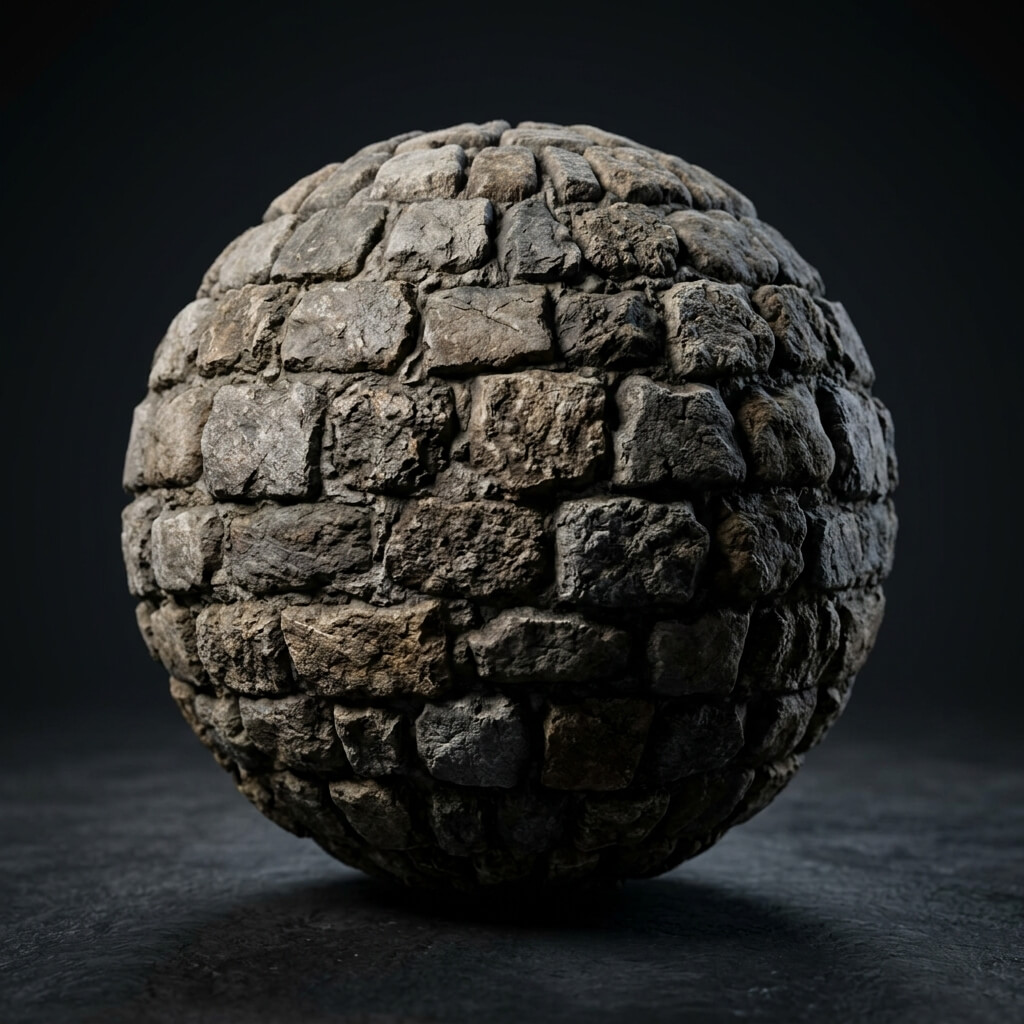
A 3D sphere utilizing a normal map to simulate deep crevices and detailed surface geometry.
How Does a Normal Map Work?
A normal map stores per-pixel surface orientation information encoded into the RGB channels of a standard image file. Each pixel in a normal map uses its Red, Green, and Blue color values to represent a directional vector in 3D space. This vector tells the rendering engine which way the surface is “facing” at that exact point, which in turn determines how light should reflect off it.
- Red Channel (R): Encodes the X axis — left and right deviation from the surface plane.
- Green Channel (G): Encodes the Y axis — up and down deviation. This is the channel that differs between OpenGL (Y+) and DirectX (Y-) conventions.
- Blue Channel (B): Encodes the Z axis — forward and backward, i.e., straight out from the surface.
This is why most normal maps appear predominantly purple (or periwinkle blue). The default “flat” surface normal points straight out (Z+), which maps to strong blue, moderate red, and moderate green — producing that characteristic violet hue. Any deviation from that flat purple represents a bump, groove, or slope on the surface.
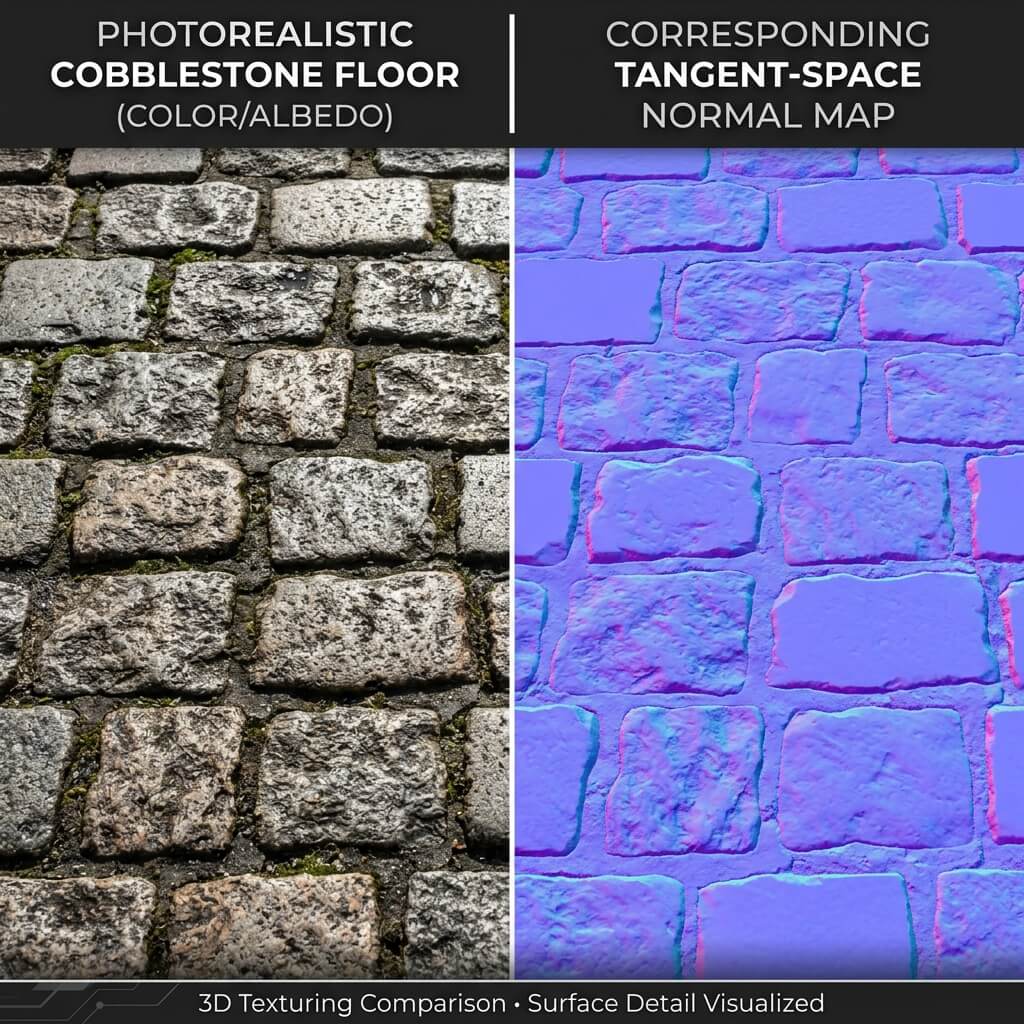
The characteristic purple hue of a tangent-space normal map, where different colors represent different surface angles.
Tangent-Space vs. Object-Space Normal Maps
There are two primary coordinate spaces in which normal maps can be authored:
Tangent-Space Normal Maps are the most common type. They encode surface normals relative to the local surface orientation, meaning the same texture can be applied to any part of a mesh regardless of its world-space orientation. Almost every game engine — including Unity, Unreal Engine 5, and Godot — expects tangent-space normal maps by default.
Object-Space Normal Maps encode normals relative to the model’s object coordinate system. They appear as a multicolored rainbow rather than a solid blue. While they can produce slightly higher quality results on static objects, they are less flexible and cannot be tiled or reused across different meshes.
For most use cases, including game development, web applications, and architectural visualization, tangent-space normal maps are the standard and recommended choice. Our Free Normal Map Generator produces tangent-space maps by default.
OpenGL (Y+) vs. DirectX (Y-) Normal Maps
One of the most common pitfalls when working with normal maps is getting the green channel direction wrong. Different rendering engines expect different conventions:
- OpenGL Convention (Y+): Used by Unity, Blender, Godot, and most open-source renderers. The green channel points “up” — meaning bright green indicates an upward-facing slope.
- DirectX Convention (Y-): Used by Unreal Engine 5, CryEngine, and some proprietary engines. The green channel is inverted — bright green indicates a downward-facing slope.
If you apply an OpenGL normal map in Unreal Engine 5 without flipping the green channel, all your bumps will appear inverted — ridges become grooves and vice versa. Our normal map generator lets you toggle between Y+ and Y- output with a single switch, so you can always export the correct format for your target engine.
Normal Map vs. Displacement Map
While both normal maps and displacement maps are used to create surface detail, they work through fundamentally different mechanisms:
Normal Maps are an optical illusion. They manipulate pixel-level lighting calculations to simulate depth and surface variation, but the actual geometry of the mesh remains completely unchanged. The silhouette of the object stays flat and smooth. Normal maps are extremely lightweight in terms of performance — they add virtually zero overhead to rendering — making them ideal for fine-grained details such as skin pores, scratches, fabric weave, and engraved text.
Displacement Maps (Height Maps) actually deform the mesh geometry at render time through tessellation or subdivision. They push vertices up and down based on grayscale brightness values, creating true geometric depth that affects the object’s silhouette, casts real shadows, and physically occludes nearby objects. However, displacement mapping is computationally expensive because it requires significantly more geometry (tessellation) to work correctly.
| Feature | Normal Map | Displacement Map |
|---|---|---|
| Method | Fakes lighting per-pixel | Moves mesh vertices |
| Silhouette | Flat / Unchanged | Changed / Real 3D depth |
| Performance | Nearly free (fast) | Expensive (requires tessellation) |
| Best For | Fine details: pores, scratches, fabric | Large forms: mountains, brick walls |
| File Format | RGB image (tangent-space) | Grayscale heightmap |
In practice, professional 3D artists combine both techniques: displacement maps for large-scale features and normal maps for fine micro-detail. Our PBR generator creates both from a single source image.
How to Create Your Own Normal Maps
The fastest way to generate a normal map is to use an online tool directly in your browser. With our Free Normal Map Online Generator, you can:
- Drag and drop any texture or photograph into the upload area.
- Adjust intensity using the real-time 3D viewport with custom HDRI lighting.
- Switch between Y+ and Y- to match your target engine (Unity or Unreal Engine).
- Download your high-resolution normal map instantly — no account required.
Everything runs 100% locally in your browser using GPU acceleration. Your images are never uploaded to any server.
Specialized Generators & Workflow Troubleshooting
Looking for specialized workflows or troubleshooting help? Explore our advanced guides:
- Specialized Generators: Free Bump Map Generator Online · Batch Process PBR Textures & Normal Maps · Shattered Glass Normal Map Generator
- Troubleshooting & Fixes: Fix Missing Texture Errors in 3D Engines · Fix Blender Textures Turn Black After Baking · Fix VRChat Avatar Invisible After Adding Texture
Related reading: How to Create Normal Maps from Photos · How to Use Normal Maps in Unity & UE5 · Free Bump Map Generator · Batch PBR Normal Map Generator